on
[GitHub]Github 비밀번호 변경 후 push 에러 해결 + personal token(windows)
얼마 전에 Github 비번을 변경했는데 블로그 업데이트를 위해 commit 후 push를 하려는데 오류가 났다.
찾아보니 git 명령어를 통해서 간단하게 해결할 수 있다 했다.
github에 변경된 비밀번호 로컬에 반영하는 방법
일단 git bash를 실행해서 .git이 있는 아무 디렉토리로 이동한 후
% git config --unset credential.helper
를 입력한다. 아무 출력없이 끝날텐데 그 다음
% git push origin master
명령어를 입력해서 push를 하면 github의 username과 password를 입력하라고 나온다.
그런데 여기서 또 다른 오류가 났다. 분명 검색 결과로는 여기서 아이디와 비번을 입력하면 오류 해결인데!
remote: Support for password authentication was removed on August 13, 2021.
Please use a personal access token instead.
remote: Please see https://github.blog/2020-12-15-token-authentication-requirements-for-git-operations/
for more information.
이렇게 8/13일 부로 비밀번호 인증서비스가 종료되고 개인 엑세스 토큰을 이용해야 한다고 오류메세지가 떴다.
personal access token 생성하는 방법
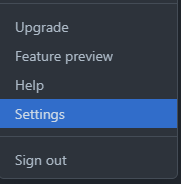
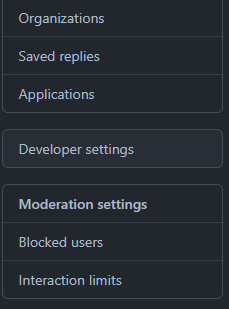
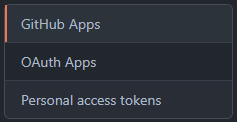
1. 깃허브에서 Settings -> Developer settings -> Personal access tokens 클릭
2. Generate new token 클릭

3. 토큰 이름 넣고 기간 설정하고 범위 선택 후 생성
4. 생성 후 페이지 나가지말고 뜨는 토큰 복사하기!(나가면 토큰 사라짐)
이렇게 token까지 생성을 완료했다면 다시 push 시도 후 뜨는 비밀번호란에 토큰을 입력하면 제대로 실행되는 것을 볼 수 있다.
참고
https://hyeon9mak.github.io/change-git-local-password
https://docs.github.com/en/authentication/keeping-your-account-and-data-secure/creating-a-personal-access-token
Discussion and feedback